

1
Check what Midplane suggests
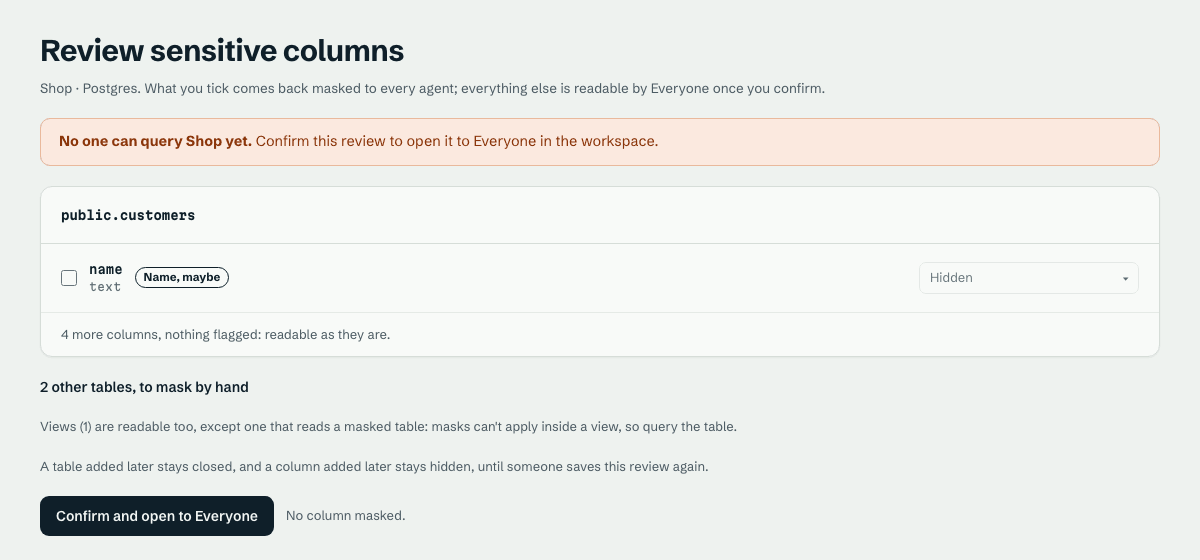
Credentials, emails, phones, identity and card numbers and dates of
birth come ticked; names, addresses and IP addresses come unticked, and
an unticked column is readable as it is. Midplane goes by the name, so a
notes column full of emails isn’t flagged: open other tables, to mask
by hand and check the tables you know hold personal data.2
Pick each mask
Pick Hashed, still joinable where agents need to join or count by
the column without seeing it, Hidden otherwise.
3
Confirm and open to Everyone
The first time, Midplane then starts drafting
metrics.Check: Sources shows the source as Readable by Everyone. To
keep tables or columns to some groups, set its access.
If a column you want masked is not listed
If a column you want masked is not listed
A flagged table’s card lists only its flagged columns. To mask another,
confirm the review, then use Mask another column on the source’s
access.
Masks
A mask applies wherever an agent reads the column: in results, filters, joins and expressions. A source’s access can clear it for some groups.Hashed, still joinable
Each value becomes the SHA-256 hash of your workspace’s salt and the value; the salt is stored encrypted and never shown to an agent or in Activity. The same value gives the same token in every table and source of the workspace, so joins,GROUP BY and COUNT(DISTINCT ...) work, and a different one in
other workspaces; case and spacing count. Someone who recognizes one row can
find that value wherever it is hashed, so use Hidden where nobody joins.
What agents see
describe_tablemarks the columns masked for the person, and an answer’s provenance line counts them.- A filter compares the masked value:
WHERE email = 'jane@example.com'on a Hidden column matches no row. - A view over a table with masked columns is denied, since a mask can’t apply inside a view: the agent is told to query the table.
- While anything is masked, only vetted built-in functions run, and database errors leave out what could quote a row.
Tables and columns added later
Midplane reads the catalog again every five minutes. Until someone saves the review again, a new table or view is closed to everyone and a new column comes back Hidden. Sources shows New tables or columns to review: check what the review marks New, then select Save the review. Saving keeps who reads what on the source’s access.What always stays closed
System schemas such aspg_catalog, and tables and views a Postgres
extension owns, such as pg_stat_monitor, whatever the review or a source’s
access says. Agents can read information_schema, which holds no values.