

query_metric or run_sql returns to an agent. Every
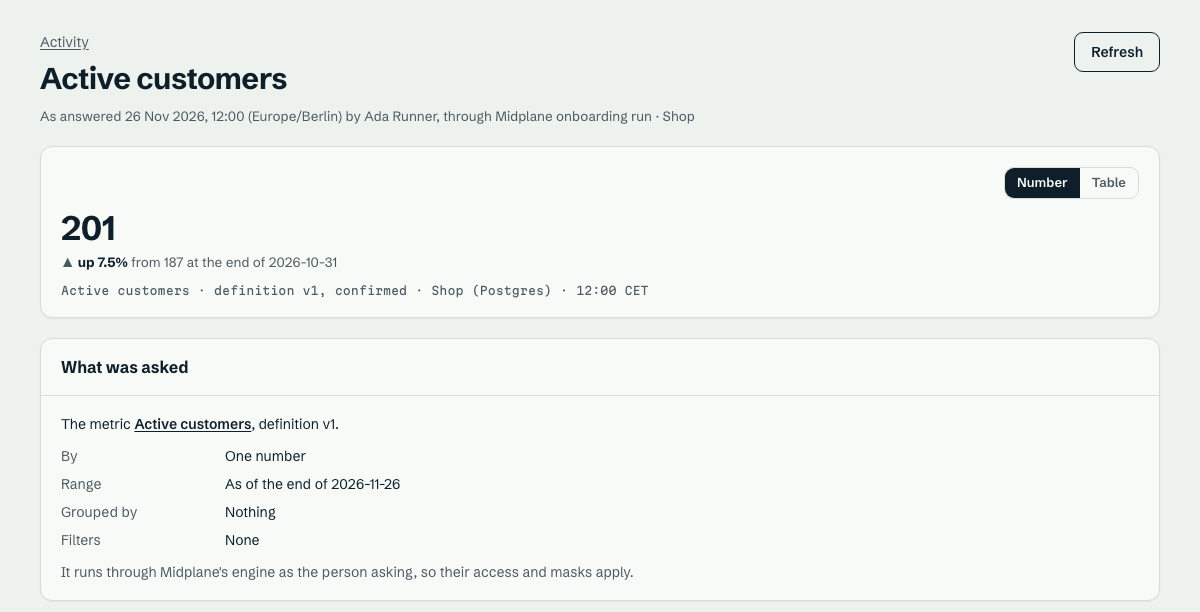
answer says where its number came from and links to its own page in the
control room, where anyone in the workspace can check it.
What an agent gets back
A sentence or two on what came back (first saying so when the metric is a draft), a table of up to 20 rows with every row as structured data, the provenance line, and the link afterThe answer in Midplane:.
SQL for run_sql),
the source, the time in the workspace’s time
zone, and any masked columns
(on MySQL, without a count). An answer holds at most 1,000 rows and 1 MiB,
and says when it was cut there: narrow or group the question to get all of
it. The fields are in the tools reference.
The chart view
Clients that show MCP Apps get the answer as a chart, with its provenance line and Open in Midplane underneath; others, such as Claude Code, get the text and the link (which client does what). Midplane picks a number, a line (up to 6 categories), bars (up to 40) or a table from the answer’s columns. A metric’s chart has its own Range, By, Group by and Filter: each change asks again, as you, and gives a new answer and link.The answer page
Snapshots
An answer keeps a snapshot, its rows exactly as the agent got them, so a shared number doesn’t change under people’s feet. Midplane keeps no other query results.- Encrypted with your workspace’s own key, which only the MCP server holds.
- Capped at 1,000 rows and 1 MiB; a larger answer keeps none.
- Kept 30 days by default. Owners and admins choose 14, 7 or 1 days, or none, under Answer snapshots on Metrics. Shortening deletes the older ones at once; expired ones are deleted every 15 minutes. The answer itself stays, and its link runs it again, for 90 days, as long as the activity log keeps its call.